Advertisement & Affiliate Disclosure: I am an independent ClickFunnels® Affiliate, not an employee. I receive referral payments from ClickFunnels. The opinions expressed here are my own and are not official statements of ClickFunnels or its parent company, Etison LLC. Some links on this page are affiliate links, which means I may receive compensation if you purchase through them, at no additional cost to you.
ClickFunnels® pricing looks simple at first: four plans, a few different price points, and a free trial. But the monthly price is only part of the decision.
The more useful question is what you actually get at each level, how much capacity you have for contacts and email, how many workspaces and team members are included, and whether you are paying for features you will never use.
That is what this guide is designed to answer.
I’ll break down the current ClickFunnels® plans, compare monthly and annual billing, explain what changes as you move up the tiers, and show which plan makes the most sense for different types of businesses.
This comparison is based on publicly available pricing and feature documentation published directly by ClickFunnels®, updated as of August 2026. We evaluate pricing pages based on specific, comparable criteria — monthly cost, annual cost, contact limits, email sending limits, workspace and team-member allowances, course limits, support tiers, and included platform features — so that the numbers here can be checked against the provider’s own site rather than taken on faith. Where a detail is time-sensitive (such as a “limited-time” inclusion), that is flagged explicitly so you know to verify it before you buy.
Last reviewed: October 2026. The plan prices and limits in this guide were checked against ClickFunnels®’ public pricing page on 20 October 2026. Prices, limits, and promotions change, so confirm current details before you buy.
Table of Contents
- Quick Answer
- Quick Verdict
- ClickFunnels® Pricing Plans
- What Each Plan Actually Includes
- What Really Drives the Price
- Monthly vs. Annual Billing
- The Free Trial and Money-Back Guarantee
- Which ClickFunnels® Plan Should You Choose?
- Who Each Plan Is Really Built For
- Pros and Cons of the Pricing Structure
- Alternatives Worth Comparing
- Frequently Asked Questions
- Final Verdict
- Related Guides
Quick Answer
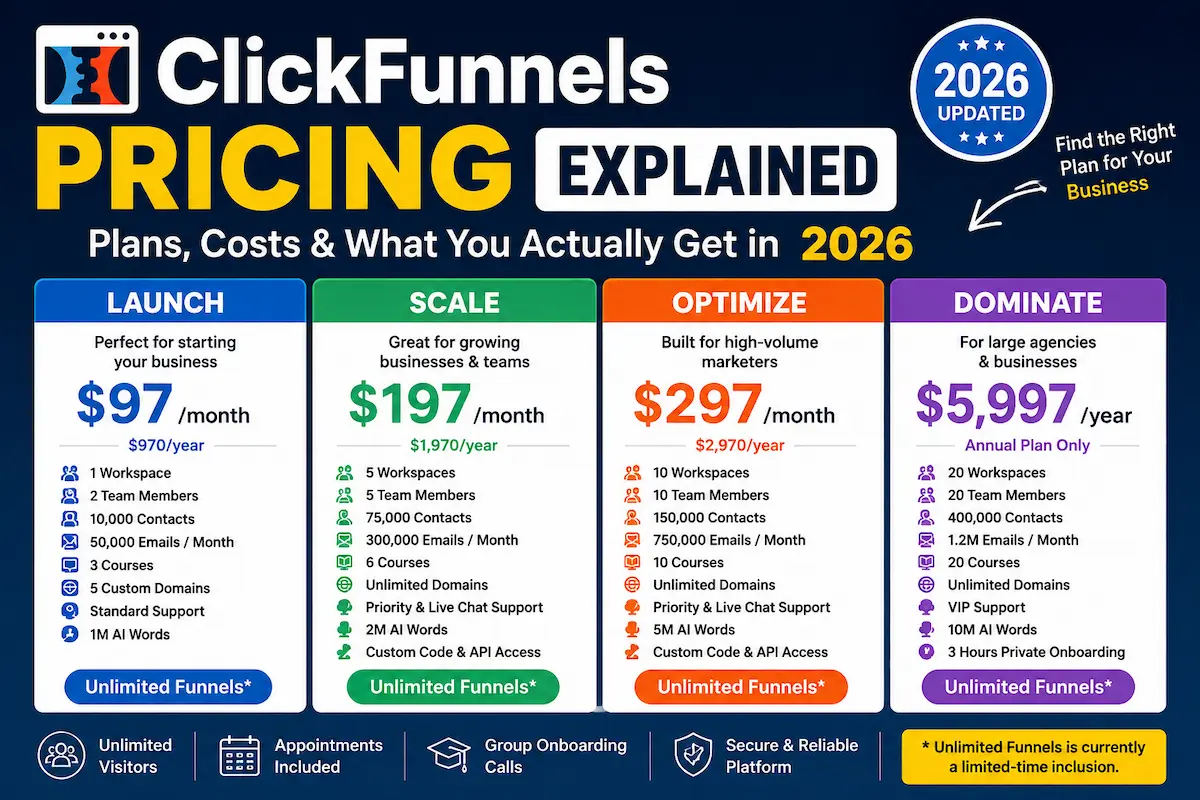
ClickFunnels® currently has four pricing tiers: Launch at $97/month, Scale at $197/month, Optimize at $297/month, and Dominate at $5,997/year. The first three plans are available with monthly or annual billing, while Dominate is annual-only.
The important difference between the plans is not simply the number of funnels you can create. Contact limits, monthly email capacity, workspaces, team members, courses, support and advanced features increase as you move up the pricing tiers.
One important detail: ClickFunnels® currently lists unlimited funnels as a limited-time inclusion on its pricing documentation. That means you should not assume this feature will remain unlimited forever without checking the current plan terms.
Quick Verdict
- Best starting point for a solo business: Launch
- Best for growing teams or several workspaces: Scale
- Best for higher-volume businesses: Optimize
- Best for larger agencies with many workspaces: Dominate
- Best value if you know you will use the platform for a full year: Annual billing
For most people starting with ClickFunnels®, I would not jump straight to Scale or Optimize. Start by looking at your actual contact count, email volume, number of people who need access, and whether you need multiple workspaces or advanced integrations.
ClickFunnels® Pricing Plans
ClickFunnels® currently publishes four plans: Launch, Scale, Optimize and Dominate. The official pricing documentation lists the following prices.
| Plan | Monthly Price | Annual Price | Best Fit |
|---|---|---|---|
| Launch | $97/month | $970/year | Solo users and small businesses |
| Scale | $197/month | $1,970/year | Growing businesses and small teams |
| Optimize | $297/month | $2,970/year | Higher-volume marketers and teams |
| Dominate | Annual only | $5,997/year | Larger agencies and businesses |
These prices are the published figures in ClickFunnels®’ current pricing documentation. Because SaaS pricing and included limits can change, check the provider’s current terms before making a purchase.
To make the tiers easier to compare at a glance, here is the same data broken down by the specific limits that actually change your day-to-day usage of the platform:
| Feature | Launch | Scale | Optimize | Dominate |
|---|---|---|---|---|
| Contacts | 10,000 | 75,000 | 150,000 | 400,000 |
| Emails/month | 50,000 | 300,000 | 750,000 | 1,200,000 |
| Workspaces | 1 | 5 | 10 | 20 |
| Team members | 2 | 5 | 10 | 20 |
| Courses | 3 | 6 | 10 | 20 |
| Custom domains | 5 | Unlimited | Unlimited | Unlimited |
| Custom code editor | No | Yes | Yes | Yes |
| Full API access | No | Yes | Yes | Yes |
| AI tool word allowance | 1 million | 2 million | 5 million | 10 million |
| Support level | Standard | Priority + live chat | Priority + live chat | VIP |
What Each Plan Actually Includes
Launch — $97/month or $970/year
Launch is the entry-level plan and is the most logical place to start if you are building funnels for one business and do not need a large team or multiple workspaces.
The current plan includes:
- 1 workspace
- 2 team members
- 10,000 contacts
- 50,000 emails per month
- 3 courses
- 5 custom domains
- Unlimited visitors
- Appointments
- Group onboarding calls
- Standard support
- AI tools with 1 million words
- Unlimited funnels listed as a limited-time inclusion
For a solo entrepreneur, coach, consultant or small business, those limits can be enough for quite a while. The main thing to watch is your contact and email volume as your audience grows.
Scale — $197/month or $1,970/year
Scale is where ClickFunnels® becomes more practical for businesses that need additional capacity or several workspaces.
The current plan includes:
- 5 workspaces
- 5 team members
- 75,000 contacts
- 300,000 emails per month
- 6 courses
- Conversion Boosters
- Countdown Funnels
- Unlimited custom domains
- Unlimited visitors
- Group onboarding calls
- Priority and live chat support
- AI tools with 2 million words
- Custom Code Editor
- Webhooks and full API access
- Unlimited funnels listed as a limited-time inclusion
The biggest reason to consider Scale is not simply that it is the next plan up. It is the combination of additional workspaces, higher contact and email limits, more team access and advanced integration capabilities.
Optimize — $297/month or $2,970/year
Optimize is aimed at businesses that have already outgrown the lower capacity limits and need more room to operate.
The current plan includes:
- 10 workspaces
- 10 team members
- 150,000 contacts
- 750,000 emails per month
- 10 courses
- Conversion Boosters
- Countdown Funnels
- Affiliate Center
- Unlimited custom domains
- Unlimited visitors
- Group onboarding calls
- Priority and live chat support
- AI tools with 5 million words
- Custom Code Editor
- Webhooks and full API access
- Unlimited funnels listed as a limited-time inclusion
For a smaller business, Optimize can be unnecessary. Its value becomes easier to justify when contact volume, email volume, workspaces or team requirements are already pushing beyond Scale.
Dominate — $5,997/year
Dominate is the highest current plan and is available on an annual basis rather than as a monthly subscription.
The current documentation lists:
- 20 workspaces
- 20 team members
- 400,000 contacts
- 1.2 million emails per month
- 20 courses
- Conversion Boosters
- Countdown Funnels
- Affiliate Center
- Unlimited custom domains
- Unlimited visitors
- 3 hours of private and group calls
- VIP support
- AI tools with 10 million words
- Custom Code Editor
- Webhooks and full API access
- SSO
- Unlimited funnels listed as a limited-time inclusion
At this level, the question is less about whether the plan is affordable in isolation and more about whether your business can actually make use of the additional capacity and support.
What Really Drives the Price?
This is where ClickFunnels® pricing becomes easier to understand.
If you only look at the headline prices, the jump from $97 to $197 and then $297 can look quite large. But the higher plans are not simply charging more for the same product.
Several capacity limits increase as you move up the tiers:
- Contacts increase from 10,000 to 75,000 to 150,000 and then 400,000.
- Monthly email capacity increases from 50,000 to 300,000 to 750,000 and then 1.2 million.
- Workspaces increase from 1 to 5, 10 and then 20.
- Team members increase from 2 to 5, 10 and then 20.
- Course limits increase from 3 to 6, 10 and then 20.
- Support becomes more extensive at the higher tiers.
- Advanced capabilities such as custom code and full API access become available on Scale and above.
So before upgrading, look at your real usage rather than assuming that a higher plan is automatically better.
For example, if you have 2,000 contacts, one workspace and a two-person team, paying for capacity designed around 150,000 contacts and 10 workspaces may not make financial sense.
On the other hand, if you are running several brands, managing multiple projects or operating a larger marketing team, the additional workspace and team capacity can become much more useful.
Monthly vs. Annual Billing
The annual plans are cheaper on an effective monthly basis, but you have to pay the annual amount upfront.
Here is the simple comparison:
| Plan | Monthly Billing | Annual Billing | Approx. Annual Saving |
|---|---|---|---|
| Launch | $97 × 12 = $1,164 | $970 | $194 |
| Scale | $197 × 12 = $2,364 | $1,970 | $394 |
| Optimize | $297 × 12 = $3,564 | $2,970 | $594 |
| Dominate | Not available monthly | $5,997 | Annual only |
For Launch, Scale and Optimize, the annual option works out to about 16.7% less than paying the corresponding monthly rate for 12 months. The official pricing page confirms the annual figures.
My practical advice is simple: if you are still deciding whether ClickFunnels® fits your workflow, monthly billing gives you more flexibility. If you already know you will use the platform for the full year, annual billing can make more financial sense.
The Free Trial and Money-Back Guarantee
ClickFunnels® currently advertises a 14-day free trial, although the pricing page does not spell out trial terms plan by plan, so confirm them at signup. ClickFunnels® also states in its pricing FAQ that it offers a 30-day money-back guarantee. Check how the trial and the guarantee apply to the plan you choose before you pay.
That does not mean you should sign up and forget about the billing terms. Before starting the trial, read the current signup and cancellation conditions carefully, especially if the offer presented to you differs from the standard trial.
A good way to use the trial is to test the things that matter to your business rather than simply clicking around the dashboard.
- Build an actual funnel.
- Test the page editor.
- Check whether the workflow fits your business.
- Look at the contact and email limits you realistically need.
- Test integrations that are important to your setup.
- Decide whether you would still use the platform after the trial ends.
That gives you a much better answer than simply asking whether the software looks good in a demo.
Try ClickFunnels® Free for 14 Days
Which ClickFunnels® Plan Should You Choose?
Choose Launch if you are a solo entrepreneur
Launch is the obvious starting point if you are building funnels for one business, working with a small team and staying comfortably below the 10,000-contact and 50,000-email monthly limits.
You probably do not need to pay more just because Scale exists.
Choose Scale if you need multiple workspaces
Scale becomes more interesting when your business needs several workspaces, more team members, higher contact capacity or advanced integration features.
It can also make sense for a growing company that knows its audience and email volume are likely to expand significantly.
Choose Optimize if capacity is becoming a real constraint
Optimize is designed for businesses that need substantially more contacts, email volume, workspaces and team capacity.
If you are nowhere near those limits, the additional monthly cost may be difficult to justify.
Choose Dominate only when you can use the capacity
Dominate is a serious annual commitment. It makes the most sense when 20 workspaces, 20 team members, 400,000 contacts, 1.2 million monthly emails and VIP support are genuinely useful to your operation.
If you cannot clearly explain why you need those limits, you probably should not start with the highest tier.
Who Each Plan Is Really Built For
- Launch is best for: Solo entrepreneurs, coaches, consultants, and single-business owners who need one workspace and a small team.
- Launch is not ideal for: Businesses that already manage multiple brands or need more than two team members with dashboard access.
- Scale is best for: Growing businesses running several workspaces, small marketing teams, or anyone who needs custom code and full API access.
- Optimize is best for: Higher-volume marketers and teams that are already bumping against Scale’s contact, email, or workspace limits.
- Dominate is best for: Agencies or larger organizations that genuinely need 20 workspaces, 20 team members, and VIP-level support.
- Dominate is not ideal for: Any business that cannot describe a concrete use for that much capacity — the annual commitment is large enough that “just in case” is not a good enough reason.
Pros and Cons of ClickFunnels® Pricing
Pros
- Several pricing levels: You can start lower and move up when your requirements increase.
- Annual savings: The annual options for Launch, Scale and Optimize reduce the effective cost compared with paying monthly for a full year — roughly $194 to $594 saved per year depending on tier.
- Increasing capacity: Higher plans provide substantially more contacts, email capacity, workspaces and team members.
- Advanced capabilities: Scale and above add features such as custom code and full API access.
- Unlimited visitors: The current plans list unlimited visitors on every tier.
Cons
- The higher tiers become expensive: $197 and $297 per month are meaningful expenses for a small business.
- Capacity can be more than you need: A small operation may never come close to the higher contact or email limits.
- Annual billing requires commitment: The lower effective monthly price comes with an upfront annual payment.
- Unlimited funnels are currently marked as limited-time: This is something buyers should not overlook when evaluating long-term value.
- Plan differences matter: Choosing a tier based only on the headline price can hide the importance of workspace, team, contact and email limits.
Alternatives Worth Comparing
ClickFunnels® is not automatically the right choice for every business.
If you are primarily comparing funnel builders and want to understand how ClickFunnels® compares with a lower-cost alternative, see our Systeme.io vs ClickFunnels® comparison. It is a useful next step if price is one of your main concerns.
If you are more interested in an all-in-one CRM and agency-focused platform, our ClickFunnels® vs GoHighLevel comparison looks at the differences between the two approaches.
And if you are still deciding which type of funnel builder makes sense for your experience level, our best funnel builder for beginners guide gives you a broader comparison rather than focusing on one platform.
You can also read our ClickFunnels® review if you want a broader look at the platform’s features, strengths and weaknesses beyond pricing.
- If you need a lower-cost starting option: Compare Launch’s $97/month against budget-focused builders before committing to ClickFunnels®.
- If you need agency-style CRM features: Weigh ClickFunnels® against GoHighLevel using the comparison linked above rather than relying on price alone.
- If you are completely new to funnel builders: Start with the beginner’s guide linked above before choosing a specific platform.
Frequently Asked Questions
How much does ClickFunnels® cost?
The current published prices are $97/month for Launch, $197/month for Scale and $297/month for Optimize. Annual pricing is $970, $1,970 and $2,970 respectively. Dominate is listed at $5,997/year and does not have a monthly option.
Is ClickFunnels® worth the price?
It depends on how much of the platform you will actually use. If you need the funnel-building and broader business tools together, the subscription can make sense. If you only need a basic landing page builder, you should compare alternatives before paying for a larger platform.
Does ClickFunnels® have a free plan?
ClickFunnels® does not currently list a permanent free plan in its published pricing tiers. It does offer a 14-day free trial, followed by the applicable subscription terms.
Does ClickFunnels® offer a money-back guarantee?
Yes. ClickFunnels®’ pricing FAQ states that it has a 30-day money-back guarantee. Review the current terms, including how they apply alongside the free trial, before purchasing because subscription conditions can change.
Which ClickFunnels® plan is best for beginners?
For most beginners, Launch is the logical starting point. It provides the basic capacity needed to get started without immediately committing to the higher monthly cost of Scale or Optimize.
Is ClickFunnels® cheaper if I pay annually?
Yes. The current annual prices for Launch, Scale and Optimize are lower than paying their monthly prices for 12 months. The effective saving is approximately 16.7% for each of those three plans.
Can I change my ClickFunnels® plan later?
Yes. ClickFunnels®’ current pricing documentation states that customers can change plans during the 14-day trial and after the trial.
Which ClickFunnels® plan is best for an agency?
There is no single answer for every agency. Scale may be enough for an agency that needs several workspaces and a small team. Optimize or Dominate becomes more relevant when the agency needs substantially more workspaces, team members, contacts and email capacity.
Does ClickFunnels® pricing include unlimited funnels?
The current official pricing documentation lists unlimited funnels on all four plans, but specifically labels this feature as a limited-time inclusion. That wording matters, so check the current pricing page before making a long-term buying decision based on unlimited funnels alone.
Can I use ClickFunnels® without any prior funnel-building experience?
Yes. The platform is built around templates and a visual editor rather than requiring coding knowledge, though newcomers should expect a learning curve during the first few funnels regardless of which plan they choose.
What happens to my funnels if I downgrade my plan?
ClickFunnels®’ published documentation notes that account and plan limits apply going forward once a downgrade takes effect; if your existing usage exceeds the lower plan’s limits, you may need to reduce contacts, workspaces, or team members to fit the new tier. Check the current terms on the pricing page before downgrading.
Final Verdict
ClickFunnels® pricing makes more sense once you stop looking only at the monthly number.
Launch at $97/month is the sensible starting point for a solo entrepreneur or small business that needs the core platform without a large amount of capacity.
Scale at $197/month becomes more attractive when you need multiple workspaces, more team members, higher contact and email limits, or advanced integration capabilities.
Optimize at $297/month is aimed at businesses that have already reached a higher level of usage and need substantially more capacity.
Dominate at $5,997/year is a very different commitment and should be considered only when the additional workspaces, team members, contact capacity, email volume and support are genuinely useful to your business.
The biggest mistake would be choosing the most expensive plan simply because it has more features. More features do not automatically mean better value.
Look at your current contact count, email volume, team size and workspace requirements first. Then choose the lowest plan that comfortably supports the way you actually work.
Ready to Test ClickFunnels®?
If the pricing and plan limits fit what you need, the most practical next step is to test the platform yourself rather than relying only on comparisons.
Start the 14-day ClickFunnels® free trial — affiliate link
Before starting, review the current trial, billing and cancellation terms presented during signup so you know exactly what happens when the trial period ends.
One final note: Pricing, plan limits and promotional offers can change. The figures in this guide reflect the current ClickFunnels® pricing documentation available when this article was prepared. Check the current terms before purchasing.
Related Guides
- ClickFunnels® Review 2026
- ClickFunnels® Alternatives: 8 Platforms Worth Comparing in 2026
- ClickFunnels® vs GoHighLevel (2026)
- Best Funnel Builder for Beginners in 2026
- GoHighLevel Pricing Guide 2026
- Systeme.io Pricing Guide 2026
About the Author
T. Vasireddi is the founder and editor of ToolGrowthHQ, creating practical, research-based guides on web hosting, WordPress, SaaS tools, and digital marketing.
His focus is on providing clear, accurate, and useful information to help readers make better technology and software decisions.
Connect with him:
Follow for more AI tool reviews, SaaS comparisons, and digital marketing tips.